
Distribution Channels & the Smart Playable URL
Game Manager · Smart Playable URL project — internal documentation for Game Manager users and integration partners.
Table of contents
- What changed, and why
- The URL, before and after
- Core concepts
- Where the old parameters went
- Channel types
- The Create Distribution Channel wizard
- Integration modes: Basic iframe vs. SDK2
- FAQ & migration notes
1. What changed, and why
Every place a game is played now has to be a declared Distribution Channel.
Before the rework, a playable's identity on the web was a bag of query parameters — a scope_id, a release_track_id, and a handful of behavior flags — assembled by whoever embedded the game. Two embeds of the same game could carry different flags, there was no single record of "this is Discord" or "this is CrazyGames," and traffic couldn't always be reliably attributed back to a specific embed location.
The Smart Playable URL project replaces that with a single opaque Distribution ID that points at a Distribution Channel — a record you create once in Game Manager. All the old flags become settings on that channel: they're set once, in one place, and every embed that uses the channel's URL inherits them automatically.
In short: the embed URL no longer describes how to run the game. It only says which channel is running it. Everything else — auth mode, allowed domain, shared player accounts, ad/payment hooks — lives on the channel record, not in the URL.
2. The URL, before and after
Same game, same embed — a much smaller surface area.
Before
https://www.pley.com/playable/v1?scope_id=8dc77860-1d91-11ef-ae0c-17a5f51982ee&release_track_id=266046ec-e5e8-11ee-92c7-3372fe41e6f8&autoplay=true&disable_auth=true&force_signup=falseAfter — Smart Playable URL
https://www.pley.com/e8eea9b0-b8d6-11f1-a538-6b32d3795a2dThe trailing segment is the Distribution ID — the identifier Game Manager generates for the channel you create in the wizard (step 6, below). It's the only thing the embedding page needs to know. Everything that used to be spelled out — scope_id, release_track_id, autoplay behavior, auth mode, the signup flag, the pga_data blob, and the parent origin — is now resolved server-side from the channel the ID points to.
3. Core concepts
| Term | What it is |
|---|---|
| Distribution Channel | A named record of one place your game is played — your own website, CrazyGames, Discord, a partner site like onlygames.io. Created once via the wizard; carries all the settings that used to be URL parameters. |
| Distribution ID | The opaque UUID identifying a channel. It's the only variable part of the new embed URL, and the value the SDK2 constructor takes as distributionId. |
| User storage base (formerly called "scope") | The pool of player accounts a channel draws from. Two channels on the same storage base share the same signed-in players; a channel on its own storage base has an isolated player set. Share a scope across channels using Pley login when they should share accounts; keep staging and production identities separate. See Environments and Testing in Game Manager — this can't be changed after the channel is created. |
| Environment (formerly called "release track") | Owns distribution channels and releases. A release updates every channel in the environment to the selected build. New games have Production and Development. See Environments and Testing in Game Manager. |
| Integration mode | Per-channel choice of Basic iframe (no host↔game messaging) or full SDK2 (postMessage handshake, host callbacks, events). Recommended: SDK2, unless the host page can't run its own JavaScript — see §7. |
Attribution is the main reason this exists: because every play session now resolves to exactly one channel record, revenue, ad impressions, and analytics events all roll up to a channel — so "how much did Discord generate" or "is onlygames.io worth the integration cost" becomes a direct query instead of a guess based on referer headers.
4. Where the old parameters went
Nothing was dropped — it moved from the URL into channel configuration.
| Old query parameter | Now lives as |
|---|---|
scope_id | User storage base (wizard step 4) — the setting formerly called scope. |
release_track_id | Environment — the setting formerly called release track. |
parent | The channel's Website allow-list (wizard step 3), instead of being asserted by the embedder. |
disable_auth / force_signup | Determined by the channel type — Playable (Pley auth) vs. Playable with external auth — plus the SDK2 auth handlers (initialToken, onIssueToken). |
autoplay, referer, pga_data | Channel-level settings and SDK2 options rather than free-form query values. |
Terminology note: these parameter labels were renamed. Environment defaults and testing workflows are explained in Environments and Testing in Game Manager. The API parameter names (
scope_id,release_track_id, and the rest) remained fully backwards compatible in this release and have not changed — Game Manager now just surfaces them under clearer labels:scope_idas User storage base, andrelease_track_idas Environment.
Note: this table reflects intent, not a byte-for-byte field mapping — some of these settings are still being consolidated on the channel settings screen. Treat it as a guide to where to look, not a guaranteed 1:1 key name.
5. Channel types
Every new channel starts from Developer managed integration — embedding the game on a site you manage, either with Pley's own authentication or your own.
- Playable — Embed the game on an external site while keeping Pley Authentication. Players sign in through Pley; the host site doesn't need to manage identity at all.
- Playable with external auth — Embed the game on an external site using your own authentication. The host is responsible for issuing and refreshing a token via the SDK2 auth handlers.
This choice is permanent. The wizard states explicitly: a channel created as one type cannot be changed to another type later. Pick the type based on who owns the player's identity on that site.
6. The Create Distribution Channel wizard
Six steps, from Game Manager → Distribution channels → Add channel.
Step 1 — Choose the channel type
Pick Developer managed integration, then Playable (Pley auth) or Playable with external auth (your own auth). See §5 above — this can't be changed after creation.
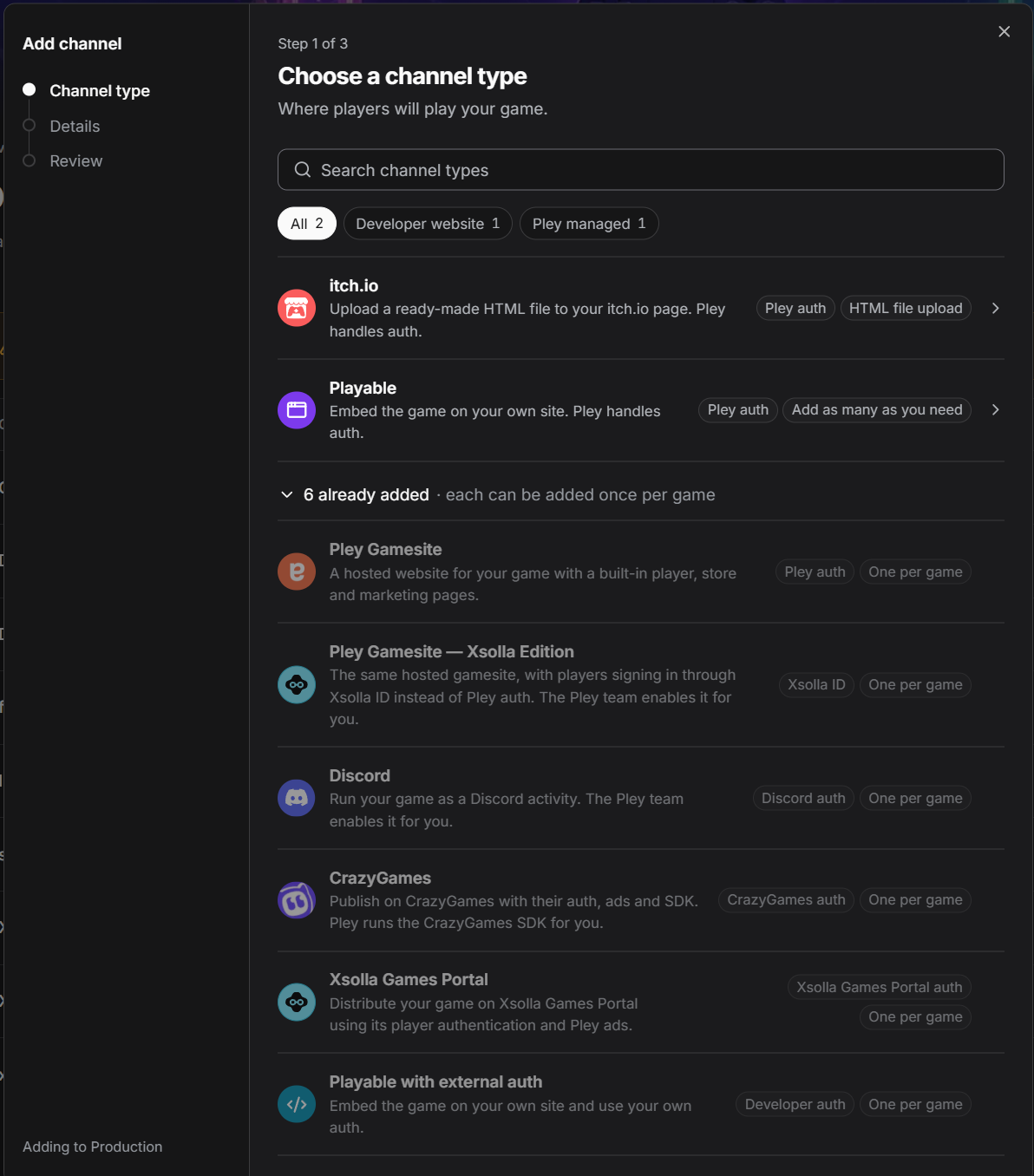
Distribution channels → Add channel
Step 2 — Setup
Name — only visible to you in the Game Manager dashboard. Use something that identifies the destination, e.g. "Discord," "CrazyGames," "onlygames.io." It has no effect on the embed or the URL.
Step 2 of 5 — Name
Step 3 — Website
The https:// top-level domain allowed to embed the game — one per channel. Enter the top-level domain (e.g. https://example.com); localized or other subdomains (en., de., etc.) aren't automatically covered — reach out to the Pley team if you need a subdomain added. Until a domain is added, the game isn't embeddable anywhere, so this step replaces what the old parent query parameter used to assert on every request. This mapping is one channel to one website, and it's fixed once the channel is created — see the FAQ below.
Step 3 of 5 — Website
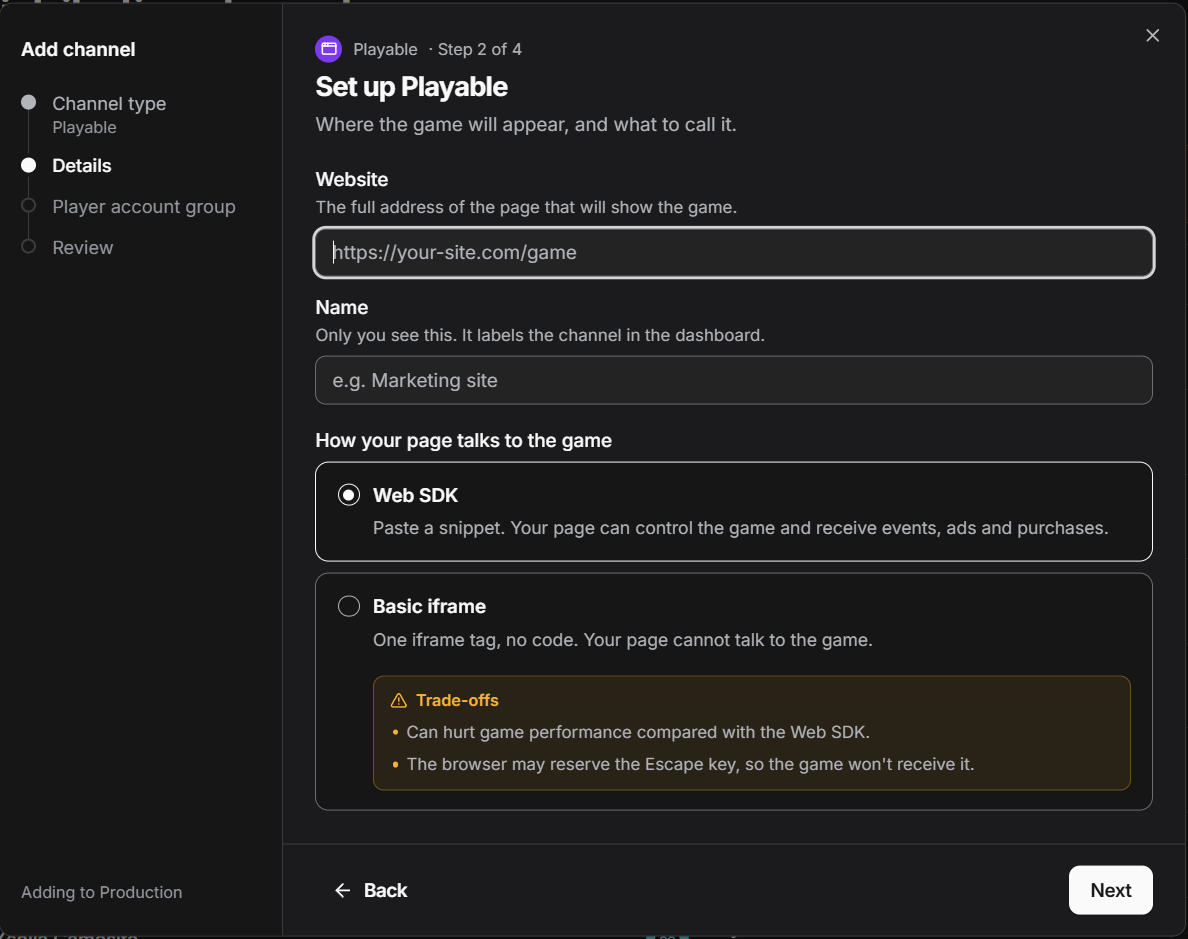
Step 4 — Player Account group (Userbase)
Choose which pool of player accounts this channel shares — pick an existing base to share players with other channels on the same base, or create a new one to keep this channel's players isolated. Share a scope across channels using Pley login when players should have one account across those channels. Keep separate backend identities, such as staging and production players, in separate scopes. Platform distributions have pre-assigned scopes; you usually do not need to configure them. See Environments and Testing in Game Manager for environment isolation and existing-account exceptions. This is also called scope in the API, and it can't be changed after the channel is created — treat it as one of the most important choices in this wizard.
Step 4 of 5 — User storage base
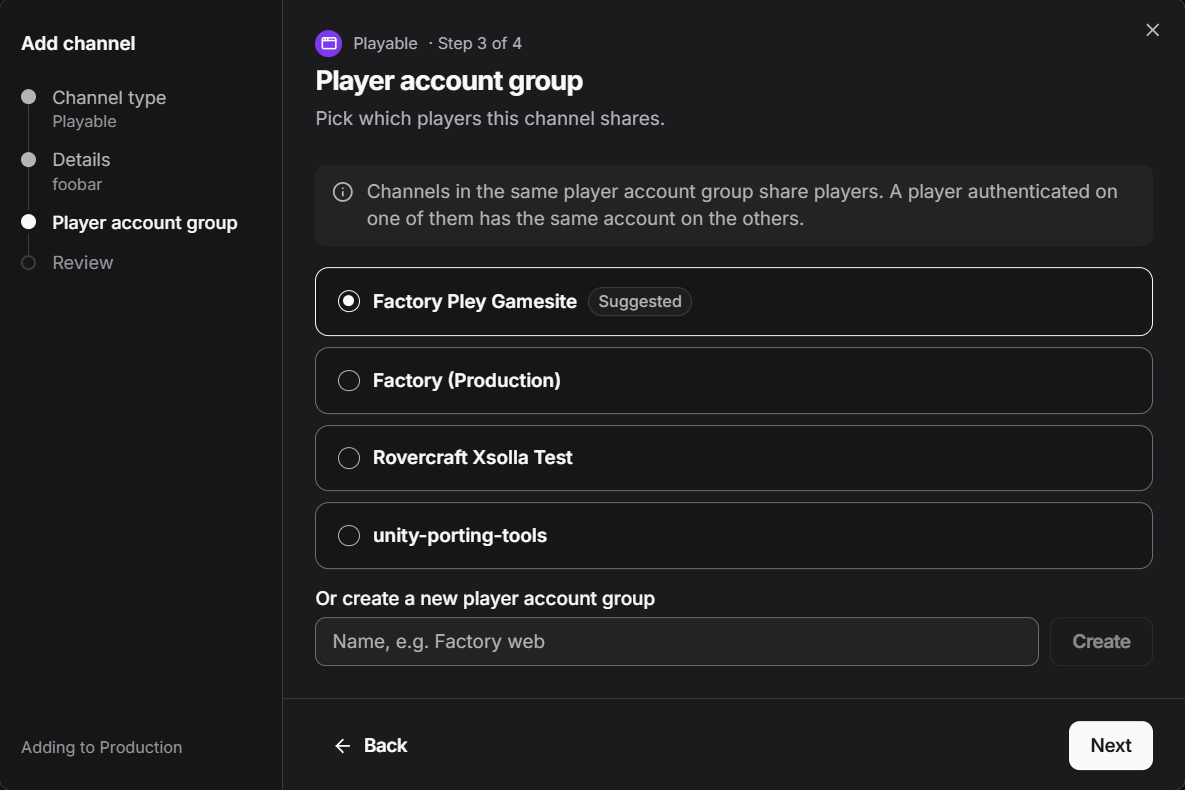
Step 5 — Review
Leave Basic iframe off. Off means the channel uses full SDK2 — the host page can send/receive events, hook ads and payments, and drive login — and that's the right choice whenever your host page is allowed to run its own JavaScript. Basic iframe exists only as a fallback for sites that don't let you add custom JavaScript at all; toggling it on drops to a plain <iframe> tag with no SDK events, ads, or payment hooks. If you can run JavaScript on the page, you should never need Basic iframe. See §7 for the tradeoffs.
7. Integration modes: Basic iframe vs. SDK2
| Basic iframe | SDK2 | |
|---|---|---|
| JavaScript required on host site | No — just an <iframe> tag, no JavaScript | Yes — instantiate Pley.WebSdk and wire up callbacks |
| Host ↔ game messaging | None | Full postMessage protocol |
| SDK events | Not available | Available via onEvent |
| Ads | Not available | onAdRequested, setAdsAreBlocked |
| Payments | Not available | onGetProducts / onStartPayment + PleyCaller |
| Auth control | Fixed by the channel type — no way to override from the host page | Works with either channel type: passive with Playable (Pley handles auth), or driven via initialToken / onIssueToken when using Playable with external auth |
Default to SDK2. Basic iframe is a fallback for the rare case where the host site won't let you add your own JavaScript at all. If you can run JavaScript, always use full SDK2 integration — it works with either channel type, and it's the only way to hook events, ads, or payments into the host page.
Pick Basic iframe only when the host page truly can't run its own JavaScript. Pick SDK2 for everything else, including any Playable with external auth channel, since external auth is driven entirely through the SDK2 token handlers.
8. FAQ & migration notes
Do existing embeds using the old URL format break?
Check with the platform team for the specific cutover/redirect plan for your title — this document covers the new model going forward, not the deprecation timeline for old-style URLs.
Can I create more than one channel for the same game?
Yes — that's expected. You don't point a channel at a game; you add channels to a game. Create one channel per destination (Discord, CrazyGames, your own website, a partner site), each with its own Distribution ID, allowed domain, and settings. That's what makes per-destination attribution possible.
Can I change a channel's allowed domain after it's created?
No. One channel maps to exactly one website, and that mapping is fixed once the channel is created — the wizard's Website step (§6, step 3) only runs at creation time. If the domain needs to change, create a new channel rather than trying to repoint the existing one.
Where do I get the SDK2 file?
It's served at https://www.pley.com/playable/v1/sdk2.js.
Updated 3 days ago