---
updatedAt: 2026-10-27T09:50:52.000Z
agentTools:
projectIndex: https://docs.pley.com/llms.txt
---
# Distribution Channels & the Smart Playable URL
Game Manager · Smart Playable URL project — internal documentation for Game Manager users and integration partners.
## Table of contents
1. [What changed, and why](#1-what-changed-and-why)
2. [The URL, before and after](#2-the-url-before-and-after)
3. [Core concepts](#3-core-concepts)
4. [Where the old parameters went](#4-where-the-old-parameters-went)
5. [Channel types](#5-channel-types)
6. [The Create Distribution Channel wizard](#6-the-create-distribution-channel-wizard)
7. [Integration modes: Basic iframe vs. SDK2](#7-integration-modes-basic-iframe-vs-sdk2)
8. [FAQ & migration notes](#8-faq--migration-notes)
***
## 1. What changed, and why
Every place a game is played now has to be a declared **Distribution Channel**.
Before the rework, a playable's identity on the web was a bag of query parameters — a `scope_id`, a `release_track_id`, and a handful of behavior flags — assembled by whoever embedded the game. Two embeds of the same game could carry different flags, there was no single record of "this is Discord" or "this is CrazyGames," and traffic couldn't always be reliably attributed back to a specific embed location.
The Smart Playable URL project replaces that with a single opaque **Distribution ID** that points at a **Distribution Channel** — a record you create once in Game Manager. All the old flags become settings on that channel: they're set once, in one place, and every embed that uses the channel's URL inherits them automatically.
> **In short:** the embed URL no longer describes *how* to run the game. It only says *which channel* is running it. Everything else — auth mode, allowed domain, shared player accounts, ad/payment hooks — lives on the channel record, not in the URL.
***
## 2. The URL, before and after
Same game, same embed — a much smaller surface area.
**Before**
```
https://www.pley.com/playable/v1?scope_id=8dc77860-1d91-11ef-ae0c-17a5f51982ee&release_track_id=266046ec-e5e8-11ee-92c7-3372fe41e6f8&autoplay=true&disable_auth=true&force_signup=false
```
**After — Smart Playable URL**
```
https://www.pley.com/e8eea9b0-b8d6-11f1-a538-6b32d3795a2d
```
The trailing segment is the **Distribution ID** — the identifier Game Manager generates for the channel you create in the wizard (step 6, below). It's the only thing the embedding page needs to know. Everything that used to be spelled out — `scope_id`, `release_track_id`, autoplay behavior, auth mode, the signup flag, the `pga_data` blob, and the `parent` origin — is now resolved server-side from the channel the ID points to.
***
## 3. Core concepts
| Term | What it is |
| --------------------------------------------------- | ----------------------------------------------------------------------------------------------------------------------------------------------------------------------------------------------------------------------------------------------------------------------------------------------------------------------------------------------------------------------------------------------------------------------------------------------------------- |
| **Distribution Channel** | A named record of one place your game is played — your own website, CrazyGames, Discord, a partner site like onlygames.io. Created once via the wizard; carries all the settings that used to be URL parameters. |
| **Distribution ID** | The opaque UUID identifying a channel. It's the only variable part of the new embed URL, and the value the SDK2 constructor takes as `distributionId`. |
| **User storage base** *(formerly called "scope")* | The pool of player accounts a channel draws from. Two channels on the same storage base share the same signed-in players; a channel on its own storage base has an isolated player set. Share a scope across channels using Pley login when they should share accounts; keep staging and production identities separate. See [Environments and Testing in Game Manager](https://docs.pley.com/docs/environments-and-testing) — this can't be changed after the channel is created. |
| **Environment** *(formerly called "release track")* | Owns distribution channels and releases. A release updates every channel in the environment to the selected build. New games have Production and Development. See [Environments and Testing in Game Manager](https://docs.pley.com/docs/environments-and-testing). |
| **Integration mode** | Per-channel choice of *Basic iframe* (no host↔game messaging) or full *SDK2* (postMessage handshake, host callbacks, events). **Recommended:** SDK2, unless the host page can't run its own JavaScript — see [§7](#7-integration-modes-basic-iframe-vs-sdk2). |
Attribution is the main reason this exists: because every play session now resolves to exactly one channel record, revenue, ad impressions, and analytics events all roll up to a channel — so "how much did Discord generate" or "is onlygames.io worth the integration cost" becomes a direct query instead of a guess based on referer headers.
***
## 4. Where the old parameters went
Nothing was dropped — it moved from the URL into channel configuration.
| Old query parameter | Now lives as |
| --------------------------------- | --------------------------------------------------------------------------------------------------------------------------------------------------------- |
| `scope_id` | **User storage base** (wizard step 4) — the setting formerly called *scope*. |
| `release_track_id` | **Environment** — the setting formerly called *release track*. |
| `parent` | The channel's **Website** allow-list (wizard step 3), instead of being asserted by the embedder. |
| `disable_auth` / `force_signup` | Determined by the channel type — *Playable* (Pley auth) vs. *Playable with external auth* — plus the SDK2 auth handlers (`initialToken`, `onIssueToken`). |
| `autoplay`, `referer`, `pga_data` | Channel-level settings and SDK2 options rather than free-form query values. |
> **Terminology note:** these parameter labels were renamed. Environment defaults and testing workflows are explained in [Environments and Testing in Game Manager](https://docs.pley.com/docs/environments-and-testing). The API parameter names (`scope_id`, `release_track_id`, and the rest) remained fully backwards compatible in this release and have not changed — Game Manager now just surfaces them under clearer labels: `scope_id` as **User storage base**, and `release_track_id` as **Environment**.
> **Note:** this table reflects intent, not a byte-for-byte field mapping — some of these settings are still being consolidated on the channel settings screen. Treat it as a guide to where to look, not a guaranteed 1:1 key name.
***
## 5. Channel types
Every new channel starts from **Developer managed integration** — embedding the game on a site you manage, either with Pley's own authentication or your own.
* **Playable** — Embed the game on an external site while keeping Pley Authentication. Players sign in through Pley; the host site doesn't need to manage identity at all.
* **Playable with external auth** — Embed the game on an external site using your own authentication. The host is responsible for issuing and refreshing a token via the SDK2 auth handlers.
> **This choice is permanent.** The wizard states explicitly: a channel created as one type cannot be changed to another type later. Pick the type based on who owns the player's identity on that site.
***
## 6. The Create Distribution Channel wizard
Six steps, from Game Manager → Distribution channels → **Add channel**.
### Step 1 — Choose the channel type
Pick **Developer managed integration**, then **Playable** (Pley auth) or **Playable with external auth** (your own auth). See [§5](#5-channel-types) above — this can't be changed after creation.
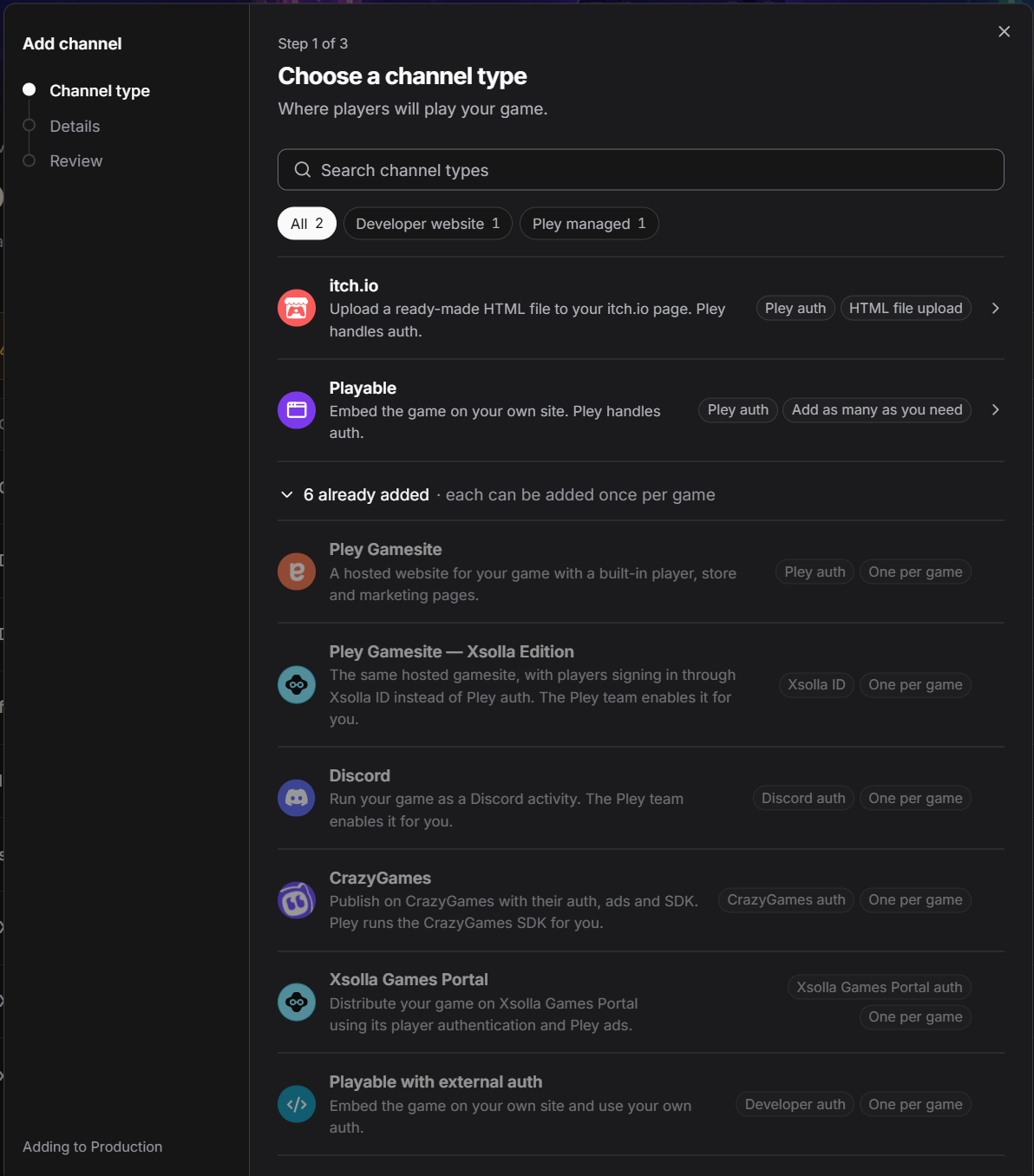
*Distribution channels → Add channel*
### Step 2 — Setup
Name — only visible to you in the Game Manager dashboard. Use something that identifies the destination, e.g. *"Discord," "CrazyGames," "onlygames.io."* It has no effect on the embed or the URL.
*Step 2 of 5 — Name*
### Step 3 — Website
The `https://` top-level domain allowed to embed the game — one per channel. Enter the top-level domain (e.g. `https://example.com`); localized or other subdomains (`en.`, `de.`, etc.) aren't automatically covered — reach out to the Pley team if you need a subdomain added. Until a domain is added, the game isn't embeddable anywhere, so this step replaces what the old `parent` query parameter used to assert on every request. This mapping is one channel to one website, and it's fixed once the channel is created — see the FAQ below.
*Step 3 of 5 — Website*
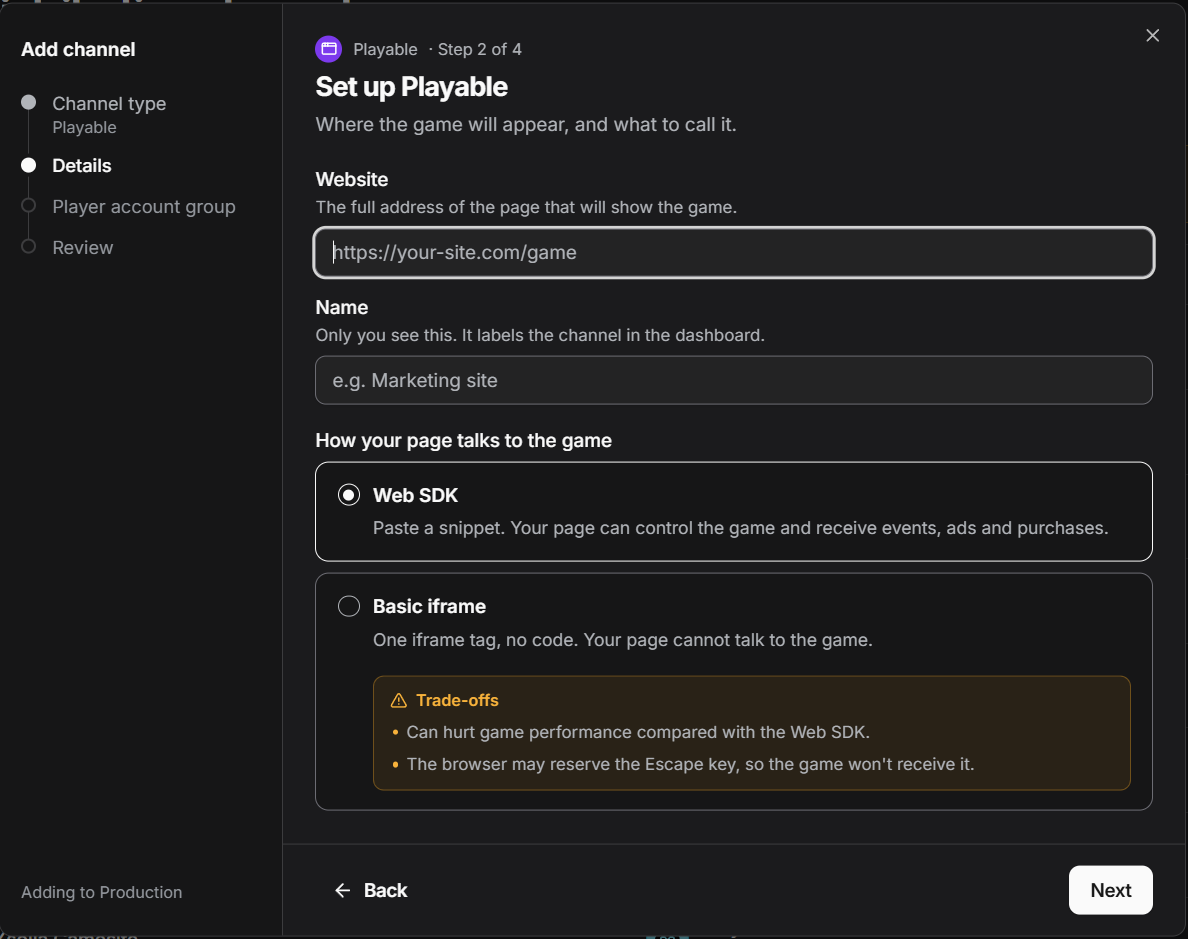
### Step 4 — Player Account group (Userbase)
Choose which pool of player accounts this channel shares — pick an existing base to share players with other channels on the same base, or create a new one to keep this channel's players isolated. Share a scope across channels using Pley login when players should have one account across those channels. Keep separate backend identities, such as staging and production players, in separate scopes. Platform distributions have pre-assigned scopes; you usually do not need to configure them. See [Environments and Testing in Game Manager](https://docs.pley.com/docs/environments-and-testing) for environment isolation and existing-account exceptions. This is also called *scope* in the API, and **it can't be changed after the channel is created** — treat it as one of the most important choices in this wizard.
*Step 4 of 5 — User storage base*
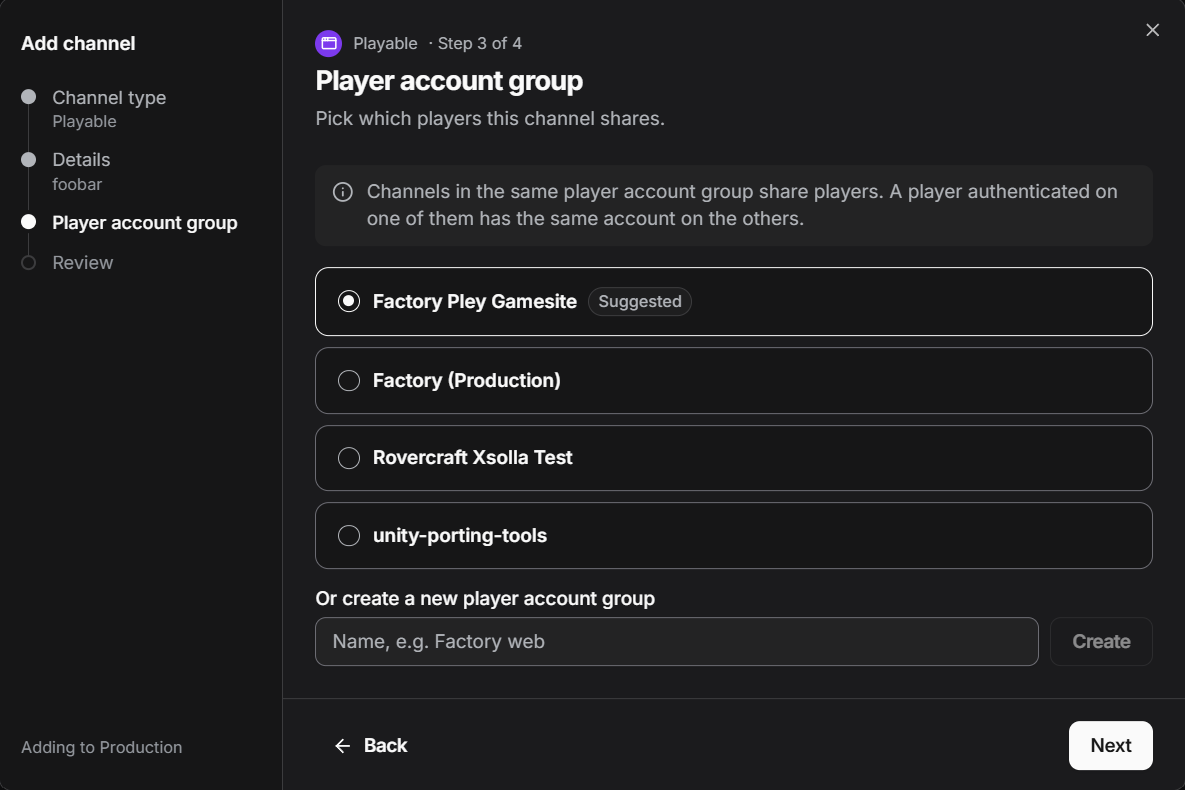
### Step 5 — Review
**Leave Basic iframe off.** Off means the channel uses full **SDK2** — the host page can send/receive events, hook ads and payments, and drive login — and that's the right choice whenever your host page is allowed to run its own JavaScript. Basic iframe exists only as a fallback for sites that don't let you add custom JavaScript at all; toggling it on drops to a plain `